GitHub: https://github.com/huseyinbabal/taws
taws - Terminal UI for AWS
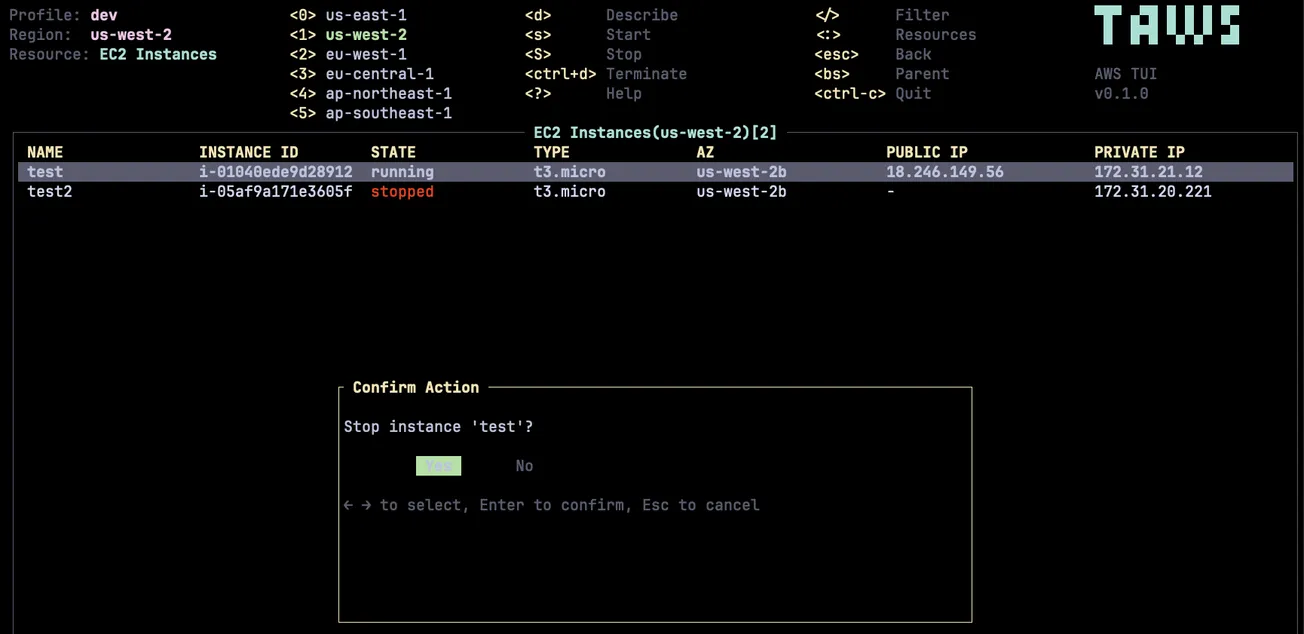
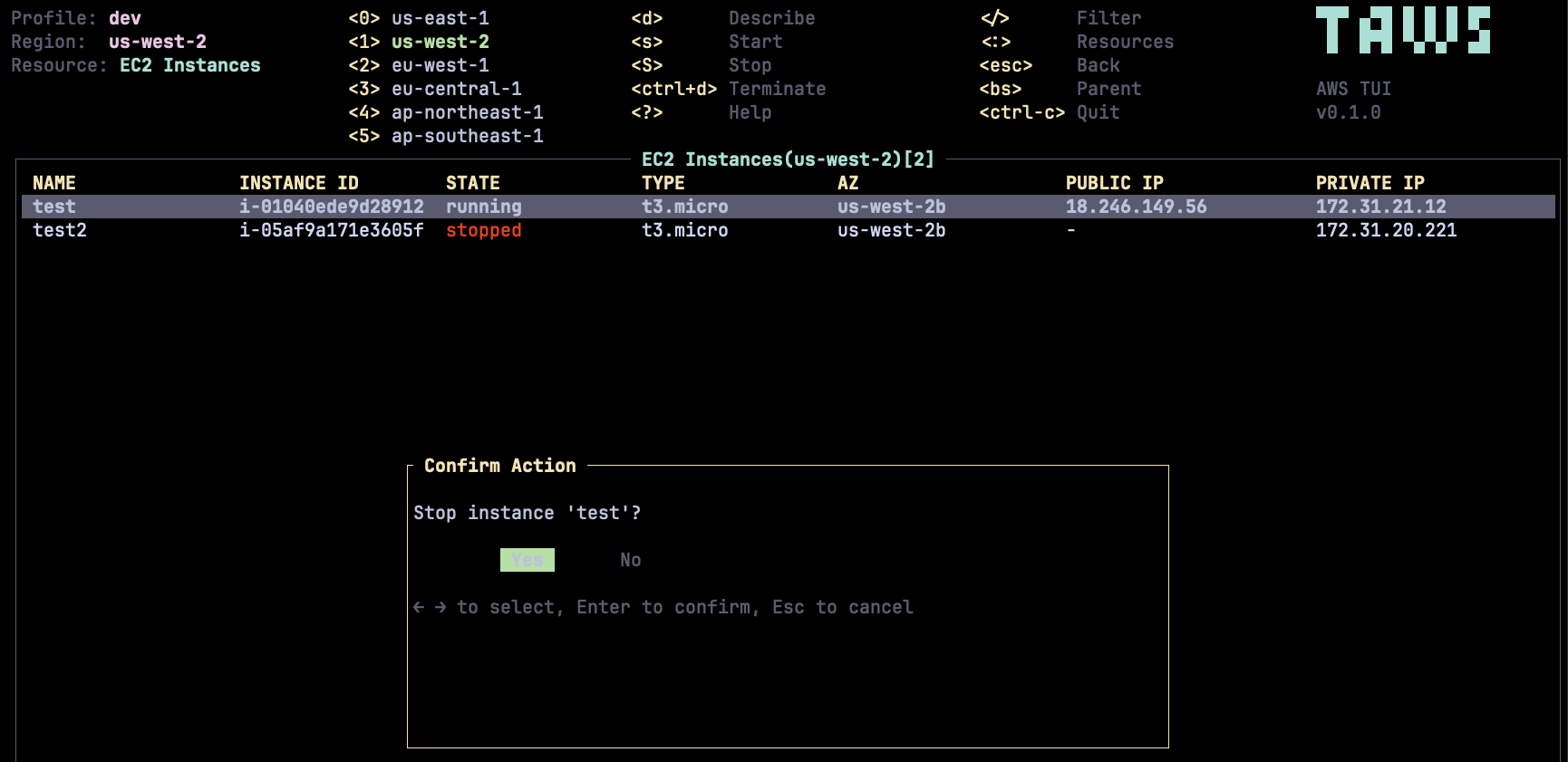
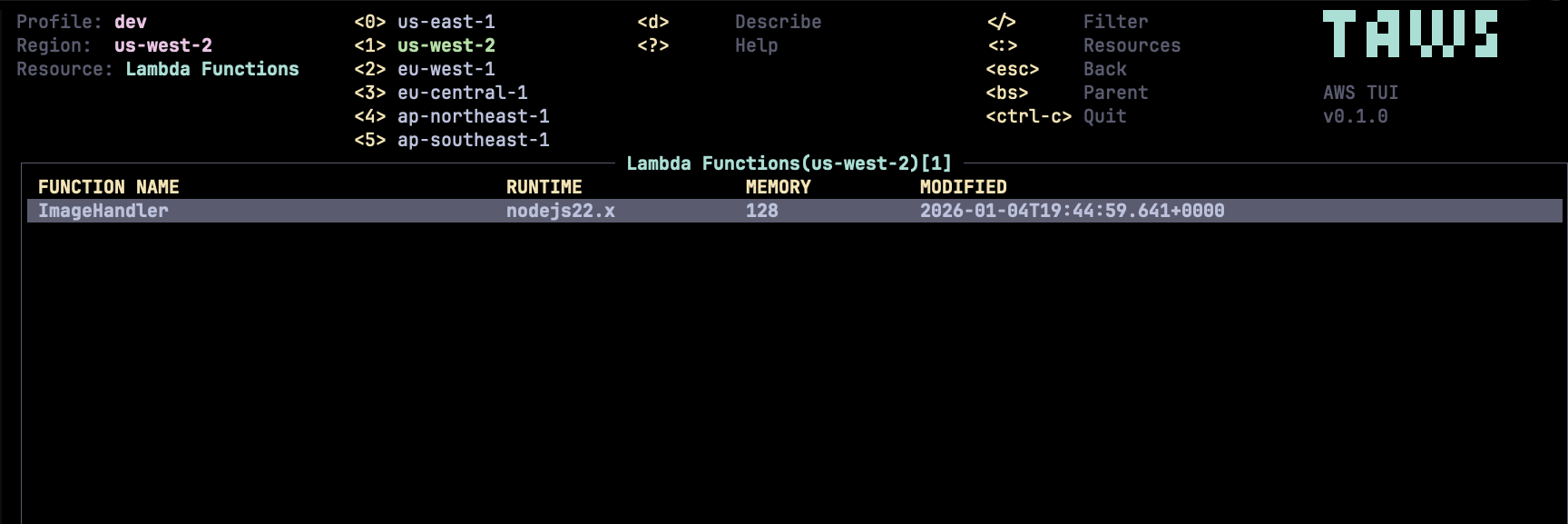
taws provides a terminal UI to interact with your AWS resources. The aim of this project is to make it easier to navigate, observe, and manage your AWS infrastructure in the wild.
Screenshots
Features
- Multi-Profile Support - Easily switch between AWS profiles
- Multi-Region Support - Navigate across different AWS regions
- 94+ Resource Types - Browse and manage resources across 60+ AWS services
- Manual Refresh - Refresh resources with a single keystroke
- Pagination - Navigate through large resource lists with
]/[keys - Keyboard-Driven - Vim-like navigation and commands
- Resource Actions - Start, stop, terminate EC2 instances directly
- Detailed Views - JSON/YAML view of resource details
- Filtering - Filter resources by name or attributes
- Autocomplete - Smart resource type autocomplete with fuzzy matching
Installation
Homebrew (macOS/Linux)
brew install huseyinbabal/tap/taws
Scoop (Windows)
scoop bucket add huseyinbabal https://github.com/huseyinbabal/scoop-bucket
scoop install taws
Download Pre-built Binaries
Download the latest release from the Releases page.
| Platform | Architecture | Download |
|---|---|---|
| macOS | Apple Silicon (M1/M2/M3) | taws-aarch64-apple-darwin.tar.gz |
| macOS | Intel | taws-x86_64-apple-darwin.tar.gz |
| Linux | x86_64 | taws-x86_64-unknown-linux-gnu.tar.gz |
| Linux | ARM64 | taws-aarch64-unknown-linux-gnu.tar.gz |
| Windows | x86_64 | taws-x86_64-pc-windows-msvc.zip |
Quick Install (macOS/Linux)
# macOS Apple Silicon
curl -sL https://github.com/huseyinbabal/taws/releases/latest/download/taws-aarch64-apple-darwin.tar.gz | tar xz
sudo mv taws /usr/local/bin/
# macOS Intel
curl -sL https://github.com/huseyinbabal/taws/releases/latest/download/taws-x86_64-apple-darwin.tar.gz | tar xz
sudo mv taws /usr/local/bin/
# Linux x86_64
curl -sL https://github.com/huseyinbabal/taws/releases/latest/download/taws-x86_64-unknown-linux-gnu.tar.gz | tar xz
sudo mv taws /usr/local/bin/
# Linux ARM64
curl -sL https://github.com/huseyinbabal/taws/releases/latest/download/taws-aarch64-unknown-linux-gnu.tar.gz | tar xz
sudo mv taws /usr/local/bin/
Windows
- Download
taws-x86_64-pc-windows-msvc.zipfrom the Releases page - Extract the zip file
- Add the extracted folder to your PATH, or move
taws.exeto a directory in your PATH
Using Cargo
From Source
taws is built with Rust. Make sure you have Rust 1.70+ installed, along with a C compiler and linker.
Build Dependencies
| Platform | Install Command |
|---|---|
| Amazon Linux / RHEL / Fedora | sudo yum groupinstall "Development Tools" -y |
| Ubuntu / Debian | sudo apt update && sudo apt install build-essential -y |
| macOS | xcode-select --install |
| Windows | Install Visual Studio Build Tools |
# Clone the repository
git clone https://github.com/huseyinbabal/taws.git
cd taws
# Build and run
cargo build --release
./target/release/taws
Prerequisites
- AWS Credentials - See Authentication section below
- IAM Permissions - Your AWS user/role needs appropriate read permissions for the services you want to browse. At minimum, you'll need
Describe*andList*permissions.
Authentication
taws uses a credential chain, trying each source in order:
| Priority | Source | Description |
|---|---|---|
| 1 | Environment Variables | AWS_ACCESS_KEY_ID, AWS_SECRET_ACCESS_KEY, AWS_SESSION_TOKEN |
| 2 | AWS SSO | If profile has SSO configured, uses SSO (prompts for login if needed) |
| 3 | Credentials File | ~/.aws/credentials |
| 4 | Config File | ~/.aws/config |
| 5 | IMDSv2 | EC2 instance metadata |
AWS SSO
taws supports AWS SSO. If your profile uses SSO and the token is expired, taws will prompt you to authenticate via browser.
Both SSO config formats are supported:
- Modern:
sso_sessionreference to[sso-session X]section - Legacy:
sso_start_urldirectly in profile
If you already logged in via aws sso login, taws will use the cached token automatically.
Quick Start
# Launch taws with default profile
taws
# Launch with a specific profile
taws --profile production
# Launch in a specific region
taws --region us-west-2
# Enable debug logging
taws --log-level debug
# Run in read-only mode (blocks all write operations)
taws --readonly
# Use with LocalStack or custom endpoint
taws --endpoint-url http://localhost:4566
# Or via environment variable
AWS_ENDPOINT_URL=http://localhost:4566 taws
Log File Locations
| Platform | Path |
|---|---|
| Linux | ~/.config/taws/taws.log |
| macOS | ~/Library/Application Support/taws/taws.log |
| Windows | %APPDATA%\taws\taws.log |
Key Bindings
| Action | Key | Description |
|---|---|---|
| Navigation | ||
| Move up | k / ↑ | Move selection up |
| Move down | j / ↓ | Move selection down |
| Top | gg | Jump to first item |
| Bottom | G | Jump to last item |
| Pagination | ||
| Next page | ] | Load next page of results |
| Previous page | [ | Load previous page of results |
| Views | ||
| Resource picker | : | Open resource type selector |
| Describe | Enter / d | View resource details |
| Back | Esc / Backspace | Go back to previous view |
| Help | ? | Show help screen |
| Actions | ||
| Refresh | R | Refresh current view (resets pagination) |
| Filter | / | Filter resources |
| Region shortcuts | 0-5 | Quick switch to common regions |
| Quit | Ctrl-c | Exit taws |
| EC2 Actions | ||
| Start instance | s | Start selected EC2 instance |
| Stop instance | S | Stop selected EC2 instance |
| Terminate | T | Terminate selected EC2 instance |
Resource Navigation
Press : to open the resource picker. Type to filter resources:
:ec2          # EC2 Instances
:lambda       # Lambda Functions
:s3           # S3 Buckets
:rds          # RDS Instances
:iam-users    # IAM Users
:eks          # EKS Clusters
Use Tab to autocomplete and Enter to select.
Supported AWS Services
taws supports 30 AWS services with 49 resource types covering 95%+ of typical AWS usage:
| Category | Service | Resources |
|---|---|---|
| Compute | EC2 | Instances |
| Lambda | Functions | |
| ECS | Clusters, Services, Tasks | |
| EKS | Clusters | |
| Auto Scaling | Auto Scaling Groups | |
| Storage | S3 | Buckets |
| Database | RDS | Instances, Snapshots |
| DynamoDB | Tables | |
| ElastiCache | Clusters | |
| Networking | VPC | VPCs, Subnets, Security Groups |
| ELBv2 | Load Balancers, Listeners, Rules, Target Groups, Targets | |
| Route 53 | Hosted Zones | |
| CloudFront | Distributions | |
| API Gateway | REST APIs | |
| Security | IAM | Users, Groups, Roles, Policies, Access Keys |
| Secrets Manager | Secrets | |
| KMS | Keys | |
| ACM | Certificates | |
| Cognito | User Pools | |
| Management | CloudFormation | Stacks |
| CloudWatch | Log Groups | |
| CloudTrail | Trails | |
| SSM | Parameters | |
| STS | Caller Identity | |
| Messaging | SQS | Queues |
| SNS | Topics | |
| EventBridge | Event Buses, Rules | |
| Containers | ECR | Repositories |
| DevOps | CodePipeline | Pipelines |
| CodeBuild | Projects | |
| Analytics | Athena | Workgroups |
Missing a service? Start a discussion to propose adding it!
Configuration
See Authentication for credential setup.
Environment Variables
| Variable | Description |
|---|---|
AWS_PROFILE | Default AWS profile to use |
AWS_REGION | Default AWS region |
AWS_DEFAULT_REGION | Fallback region (if AWS_REGION not set) |
AWS_ACCESS_KEY_ID | AWS access key |
AWS_SECRET_ACCESS_KEY | AWS secret key |
AWS_SESSION_TOKEN | AWS session token (for temporary credentials) |
AWS_ENDPOINT_URL | Custom endpoint URL (for LocalStack, etc.) |
Known Issues
- Some resources may require specific IAM permissions not covered by basic read-only policies
- Total resource count is not displayed due to AWS API limitations (most AWS APIs don't return total count)
- Some global services (IAM, Route53, CloudFront) always use us-east-1
Contributing
Contributions are welcome! Please see our Contributing Guide for details.
Important: Before adding a new AWS service, please start a discussion first.
Acknowledgments
- Inspired by k9s - the awesome Kubernetes CLI
- Built with Ratatui - Rust TUI library
- Uses aws-sigv4 for request signing
License
This project is licensed under the MIT License - see the LICENSE file for details.